Get State Code from Country
This service enables you to efficiently retrieve state codes corresponding to a given country. By automating the process of mapping states to their respective codes, it ensures data consistency and accuracy in applications like logistics, database management, and geographic analysis.
Service Name: getStateCodeFromCountrye
Service Type: Basic Utility Services
Service Description
You can use this service to get state code from country and state. For example,
- You have an String named country with value “United States” and another String named state with value “Alaska” The API will return an String with value “AK”.
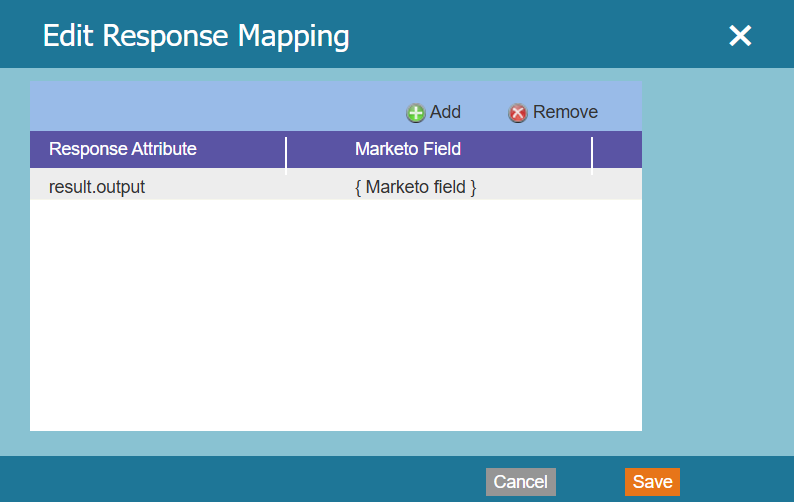
The Query Parameters below tell about the name of the request parameters whose values will be passed from Marketo. The output parameter tells about the key in the output JSON which will be mapped to the respective field in Marketo.
Please note that the request parameters values (in step 2) and Marketo Fields (in step 4) are just for example. You have to enter the values as per your service requirement.
Steps to configure service getStateCodeFromCountry in Marketo
1. Go to Admin and click Webhooks. Click New Webhook.
2. Name and configure your webhook for Service getStateCodeFromCountry.
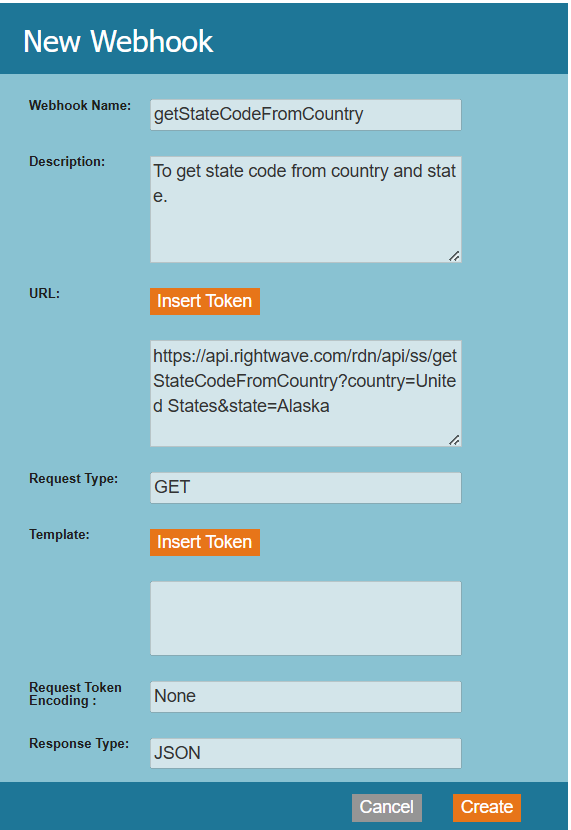
Webhook Name: Name of the webhook. In the above example, the Webhook name is the same as the Service name. Webhook name can be provided as per requirement.
URL: The URL of the Service getStateCodeFromCountry. The URL has domain and query parameters which will remain the same. You just have to change the parameter values with Marketo Token. To insert a token, click Insert Token.
Template: It will remain blank.
Request Token Encoding: For POST method it will remain None, and for GET this field will be disabled and the default value of the field will be Form/Url.
Response type: Select the response format as JSON.
Request Type: The Request Type will remain the same (i.e) GET as given in the example.
3. Add Authentication Header.
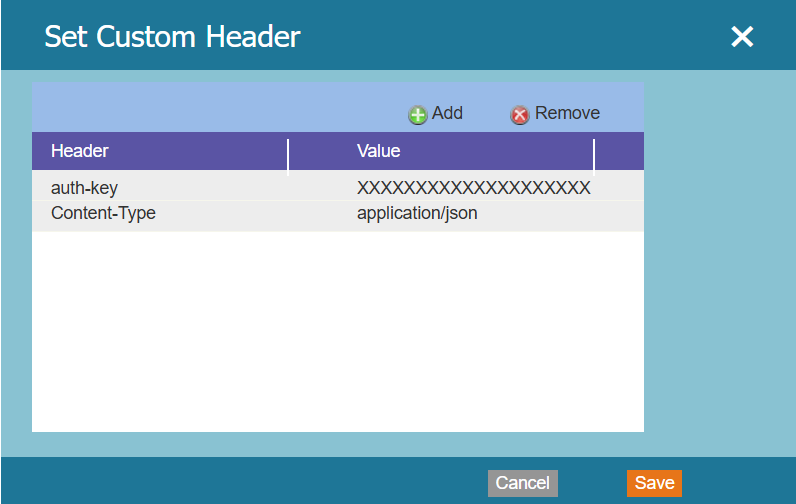
Please note that the auth-key shown above is the original auth-key. So, the same value of auth-key and Content-Type should be used while configuring Webhook as shown.
- Response Mappings: Response Mappings are created via a pairing of a Response Attribute. The Response attribute depends on the output you are returning from the Custom service JavaScript function. It is recommended to return JSON from custom service so that you can easily map it with the Marketo field.